Social Worker Log Configuration
Many of the menus in the Social Worker Log were not defined during the initial creation of the plugin. Instead, recognizing that every school district is different, and needs will change over time, the plugin utilizes Code Sets that can be configured by the school district to populate drop-down menu options.
These Code Sets were created by GSD Educational Services during implementation, but district users may find it necessary to add new entries. It is important to never delete a code set entry. Doing so would cause issues with any pre-existing Social Worker Logs that utilized the option. Instead, a Code Set entry can be edited and an End Date can be supplied.
There are four Code Sets used by the Social Worker Logs plugin:
- Social Work Contacts - This code set houses the values that can be added as Contacts to a Social Work Log entry.
- Social Work Followup - This code set defines the types of follow-up activities that may occur.
- Social Work Referral - This code set defines the individuals/organizations that may refer students to the social worker, or to whom students may be referred by the Social Worker.
- Social Work Topics - This code set contains a list of all the reasons (both primary and secondary) that can be added as topics to a Social Worker Log entry.
Configuring Code Sets
Code Sets can only be accessed in District Office mode in PowerSchool (setting the user's school in the upper right menu to District Office). Once in District office, navigate to System Management -> Data -> Code Sets.
Selecting a Code Set
Once on the Code Set page, use the drop-down menu to select one of the four Social Work Code Sets, depending on which menu needs to have its options edited/added to.
Adding a Value to a Code Set
After selecting a code set to add a value to, click the "Add Code" button in the upper right corner.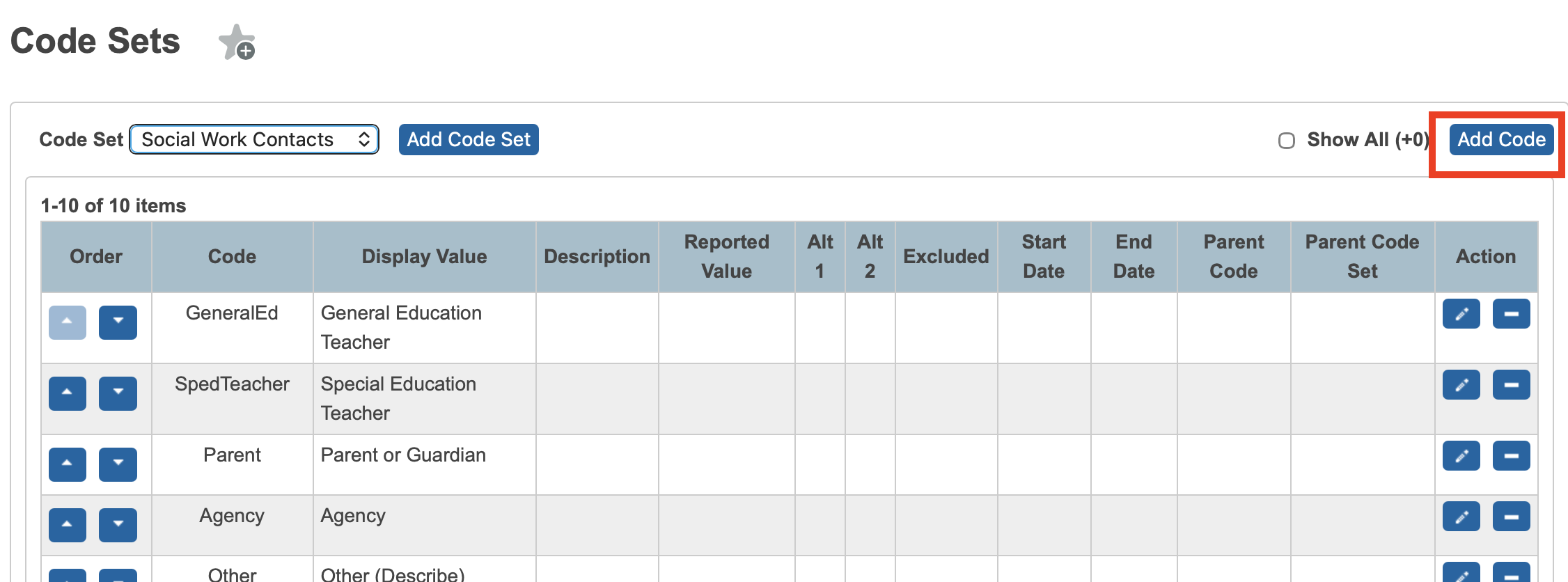
Social Worker Logs require only two of the fields that can be configured for every option - Code and Display Value. Once those are set, submit the slide-out (scroll to the bottom in the right-hand slide-out) and the new option will be available the next time a user creates/edits a Social Worker Log or views the reports.
- Code - this is a simplified value used internally to reference the particular option. This is what gets saved behind-the-scenes when the Social Worker Log is submitted. It should be representative of the value, human readable, and ideally, contain no spaces.
- Display Value - The display value is the human readable portion of the entry. It will be displayed in the drop-down menus and reports.
Related Articles
Social Worker Log Reporting
The Social Worker Log plugin contains a number of reports that assist users in determining how services are being provided to students, making sure that issues are followed up on, and identifying frequently used organizations that students are being ...Creating a Social Worker Log Entry
Navigation In order to access the Social Worker Log Entry page, the user needs to search for the student for whom the log entry needs to be created. Once the student is selected, navigate to their Behavior -> Social Work Logs page. Landing Page Each ...Gifted & Talented - Initial Meeting (Scenario A)
The GT Review Meeting (Administrator Form) documents a student's review. This article walks through an Initial Meeting or Annual Review that ends in Scenario A: Continue in GT Program - the student starts or remains in the program with new goals and ...Gifted & Talented - Setup
The entirety of the configuration for the Gifted and Talented plugin is done via a code set. The required code set is created during implementation. A single code set, GT Qualifications, holds the qualification criteria that students are evaluated ...English Learner ILP - Setup
The entirety of the configuration for the Individual Language Plan plugin is done via code sets. All the necessary code sets were created during implementation. Three code sets hold the accommodations, interventions, and related services that will be ...